

Your Virtual Pinball controller, diagnosed
A VirtuaTilt extension for Claude that reads your setup — your profiles, your DOF, your DOFLinx, etc. — and tells you what is wrong with your controller.
Any device · nothing to install
Ask Claude about VirtuaTilt
Answers from our wiki and our profile catalogue, each with a link to the page it came from. Works wherever you use Claude — on the web, in Claude Desktop and in the mobile apps.
Sign in to Claude first, or the details are lost on the way — or add it by hand.
Windows PC · Claude Desktop
Diagnose your own cabinet
A free extension that reads the profiles, DOF and DOFLinx on your cabinet PC and names the file that is wrong. It needs a VirtuaTilt you already own, Windows and the Claude Desktop app — it cannot run on a Mac, on a phone or in a browser.
The difference
Every forum, every guide and every AI can tell you what is usually wrong with a Virtual Pinball setup. None of them can see yours. This one reads your VirtuaTilt and the pinball software it depends on side by side — and nothing else does, because nobody else knows both halves.
The problem it solves
A controller that has stopped behaving is the worst kind of fault. Maybe the solenoids went quiet. Maybe a game stopped seeing the cabinet at all, or the Bluetooth pairing shows the wrong name, or the flippers work and the plunger does not, or everything works except the one table you actually wanted to play. Nothing is broken visibly, half a dozen pieces of software are involved, and every one of them looks fine on its own. So you start guessing.
Without it
- Post on a forum, wait a day.
- Get ten things to try, in no particular order.
- Rebuild a DOF config that was never broken.
- Reinstall something at midnight.
- Still not know whether it is the controller, the PC or something else.
With it
- Ask Claude, in your own words.
- It reads your actual configuration.
- It names the file and the line that is wrong.
- One question splits controller faults from PC faults.
- You fix the thing that is actually broken.
What it actually reports
Real output, from a working cabinet PC. Nothing here is a mock-up.
The PC-side pinball stack looks correctly installed. If feedback is still missing, the next step is the cabinet itself: run GUIConfigTool's Output Port Tester with no game running. If the devices fire there, the cabinet and its wiring are good.
- OK Both DOF architectures are installed (
x64\DirectOutput.dll= x64,x86\DirectOutput.dll= x86) — the normal, healthy layout: each simulator loads the build matching its own architecture. - OK DOF knows about a Pinscape controller, declared in
PicoCabinet1.xml. - OK DOFLinx is installed at
C:\DOFLinx, configuration atC:\DOFLinx\config\DOFLinx.INI. - INFO No Future Pinball installation was found.
Look at the second line. DOF declares its controller in the
cabinet config, not in directoutputconfig<id>.ini
where everybody goes looking — so searching the obvious file for “Pinscape”
finds nothing even on a perfectly working setup. That single
misunderstanding has sent countless owners off rebuilding a configuration
that was never broken. The extension knows where to look.
What it checks
- Your VirtuaTilt profiles — which are present, which one the controller is running, and whether it matches the game you are trying to play.
- DOF, and the right DOF — that it is installed, and that both builds are present if you need both. DOF ships a 32-bit and a 64-bit edition in
x86\andx64\subfolders, and its own documentation says most people want both, because the 32-bit one is required by 32-bit simulators and the 64-bit one by 64-bit simulators. The architecture is read from the file header rather than the folder name, because those folders get renamed and copied around. - Whether DOF knows about your controller — DOF declares output controllers in the cabinet configuration, while the
directoutputconfig/ledcontrolfiles hold table-to-output mappings. Different files, different questions. The check looks in both the DOF folder and itsconfig\subfolder, which is where the documentation puts the cabinet file. - DOFLinx — whether it is installed, and where its configuration file is. The usual suspect when Pinball FX runs but stays silent.
- Future Pinball — whether it is installed, and how it is wired up if you drive it through DOFLinx.
- Whether your firmware matches your download — the setup guide asks you to compare the Pico and wireless-module Build IDs against the redist by eye. This reads both and does the comparison for you. If it cannot read the cabinet, it says so and shows you the numbers to check by hand, rather than pretending everything matched.
- Where you unpacked the download — so you never have to go hunting for a folder called
VirtuaTilt-Redist-20260619-v8.0.6-….
Every finding comes back with what it means and what to do next, not just a red cross — and it tells you plainly when the PC side looks fine and the next thing to test is the controller itself.
A spare pair of hands — not a support commitment.
DOF, DOFLinx, Future Pinball and the rest are other people's software. Setting them up has always been outside 3DPTronics support, and this does not change that. 3DPTronics supports the VirtuaTilt controller: the board, its firmware, and the profiles we ship for it.
What this tool does is look at your setup and tell you what it sees, so you are not guessing alone at midnight. If it saves you an evening, it has done its job. It carries no warranty, it changes nothing, and every fix stays yours to make from the proper documentation.
It watches while the fault happens
Everything above reads your settings. The faults people actually have are events: the plunger that sometimes does not register, the flipper that occasionally misses one, the cabinet that vanishes halfway through a game. None of those show up in a configuration file, because none of them is a configuration fault.
So it can record. Start it, play, reproduce the fault, and it reports what happened while you were playing: the cabinet dropping off USB with the second it happened, the firmware stalling for long enough to lose a flip, and anything the firmware itself logged. If nothing went wrong during the recording it says exactly that, and says plainly that a fault you did not reproduce has not been ruled out.
It follows the whole chain, from the game to the solenoid
When a game gives no feedback, the cause can be anywhere along a chain that crosses three pieces of software:
the game runs → DOFLinx recognises it → the trigger DLL sends table events → DOFLinx reads that game's effect file → the effect file names a DOF ROM → DOF looks that ROM up in your table → the cabinet fires
Every link of that is on your disk, so it can be walked. Give it the name of the game -
the name on the box, not the ROM name - and it says which link is broken. That matters
because the two are rarely alike: Adventure Land is fx3_amusement to DOF, and
nobody should have to know that to get their shaker working.
The most common break is the last one: DOFLinx asks DOF for a table that your DOF configuration does not have, DOF does nothing, and nothing anywhere records it. That is what "one game is silent and everything else is fine" usually is.
It reads what DOF and DOFLinx actually did
Configuration files say what was meant to happen. DOF and DOFLinx both keep logs that say what did. Those disagree more often than you would think - a cabinet file can sit on disk, perfectly correct, while DOF never loads it at all and quietly guesses your hardware instead. Everything you set in that file is then doing nothing, and nothing tells you.
So both are read, and where they disagree the log wins, because the log describes the cabinet you are actually playing on.
On the DOFLinx side it checks the things that are documented but easy to get wrong: whether the file each game needs is beside that game's executable, whether the settings that must come first actually do, whether the output addresses name ports your cabinet has, and whether DOFLinx is set to run as administrator - which stops Pinball FX talking to it entirely, while every other check still passes.
What it will not tell you
It will not say your cabinet is healthy on the strength of a check it could not run. If it could not read something, it says so instead of assuming. If it finds nothing, it lists what it cannot see - the 12V side, anything mechanical, the Bluetooth pairing, what the game did with a perfectly good input - rather than letting silence read as a clean bill of health.
A diagnostic that always names a culprit is a horoscope. This one would rather tell you it does not know.
It can remap a button, too
Every button on your VirtuaTilt sends something to the PC — a keystroke on the Visual Pinball and Future Pinball profiles, a gamepad button on most of the others. If a game wants something different from what your button sends, the extension can change it.
You do not need to know anything technical. Ask it to list your buttons and it shows every one with what it sends today. Then say what to change, in your own words:
- “make the button that sends 5 send 3 instead”
- “the one that types esc — I want it on q”
- “swap the button that sends B over to Y”
It tells you which button that is and exactly what would change, and waits. Nothing is written until you agree.
Does this break anything else?
Not your flippers. The flipper coils fire from the flipper buttons directly, in the controller itself — that is why the flipper kick works in every profile, on every host, with or without DOF. They are not driven by the keystroke, so changing a key cannot affect them. They are also not something this tool remaps.
Not your shaker or your bumpers. Those are driven by DOF or DOFLinx from live game events, not by any button. Nothing about a keystroke touches them either way.
Not your other profiles. Each profile is a separate file and only one is loaded at a time. Editing your Visual Pinball profile does nothing to your Pinball FX or Bluetooth ones.
Not the profiles that use controller buttons. Most profiles — Pinball FX, Steam, Xbox, Switch, PlayStation, Zaccaria and the Bluetooth ones — send gamepad buttons rather than keystrokes. Those can be reassigned in exactly the same way: ask for “the button that sends B” and change it to A, X or anything else.
And never the factory reset. Some profiles put a factory-reset action on a button — the two-second hold that recovers a cabinet stuck in Xbox mode. That is a safety net, not a button assignment, and the tool refuses to touch it. Same for the plunger macros in the VR profiles.
What it protects you from
It never edits the original. The wiki is explicit — customise with “Save As” under a new filename so the shipped profile stays intact for easy restore. The tool enforces that: it always writes a new file, and refuses to overwrite one that exists.
It keeps your comments. A profile is full of notes and a licence header. Anything that reads and rewrites the file would silently throw all of that away; this changes only the quoted key, so the rest of the file is byte-for-byte what it was.
It warns before it breaks something. If your change would leave a key that no button sends any more, it says so first — because the game function bound to that key would just stop responding, with nothing to indicate why. And if two buttons send the same key, it asks which one you mean rather than guessing.
Why we built it
Configuration tools show you readings: a plunger graph, a button test, a live trace from the accelerometer. All of that is useful, and all of it only helps once you know what you are looking for.
When your cabinet goes quiet, one thing is wrong somewhere between the firmware, the profile, Windows, the game and DOF. Nothing on your screen tells you which of those five to open first. That is the part you cannot do for yourself, because if you could narrow it down you would have fixed it already.
This extension reads your cabinet and tells you the cause.
A real example, measured on a real cabinet
Night mode was on. It silences every solenoid and the shaker, and it changes nothing else, so the cabinet looks perfect and does nothing.
We asked it, in plain words: “I pressed play but I feel nothing, no thump, no vibration.” It answered in eight seconds. Night mode is on, here is what that silences, here is how to switch it off.
The wiki cannot answer that one. Night mode is not in the troubleshooting chapter at all. It is three chapters earlier, described as a feature. Search the wiki for “no feedback” and you get surround sound, DOFLinx and shaker strength. Good pages. Not the answer.
What you can ask it
What is wrong. One question, in your own words, in your own language. It checks the firmware, the profile, your PC software, the game and the wiring, then gives you the most likely cause first. If it finds nothing, it says so and tells you what it could not check. It does not invent an answer.
What my cabinet does. Every button and what it sends. Every output, and whether the controller drives it by itself or it is waiting for DOF on the PC. That difference matters: get it wrong and you either install software you never needed, or wait for feedback that was never coming.
Will this game work tonight. Name the game. It checks what your cabinet is running, what the game needs, what is on your PC, and what the game will ask of you. Some VR titles ignore a cabinet until you make a gesture first. One needs a setting re-selected every time it starts. You find out before you play, not after twenty minutes of blaming your cabinet.
Is my cabinet healthy. The firmware keeps a log of its own startup. It holds the real list of which boot button loads which profile on your cabinet, and it is the only place safe mode shows up. Safe mode is where the controller retreats after a crash: most things are switched off, while the configuration on disk still looks perfect.
Should I install this newer download. It compares the two and tells you what actually changed, including whether the firmware is really different. If it is identical, it says there is nothing to flash, instead of sending you through a firmware update for a renamed folder.
What it will not do
It will not change anything without asking. Every change is described first and waits for you to agree. It takes a backup before it writes, then reads your cabinet back afterwards to confirm the change really happened. Backups are listed by date and by which profile they hold, and you can put any of them back.
It will not pretend to know things. It cannot tell a finished release from a beta download. It cannot see whether DOF is set up for the exact game you are playing. It cannot see a stale Bluetooth pairing on your headset. When it cannot check something, it tells you, instead of leaving it out and letting the answer look complete.
It will not tell you to rewire a cabinet that works. It can see that a cabinet is on a USB 3.0 port behind a hub, which the manual suggests avoiding. It stays quiet about that unless you are actually losing the connection. A warning that fires on a healthy machine is a warning people learn to ignore.
Get it
asks before it writes free
Download v0.45.32-beta · 164 KB Needs Windows + Claude Desktop
SHA-256 8e695ce442c6fea615940c43c77b99a7480c44aada1467fd9dac879a3e8196c2
It needs a VirtuaTilt you already own — it is a diagnostic tool for your controller, not a demo.
Get-FileHash virtuatilt-local-0.45.32-beta.mcpb
The result must match the SHA-256 above, character for
character. If it does not, delete the file and tell us —
do not install it.
Installing it
The extension runs inside Claude Desktop — the app you install on your PC, not Claude in a browser tab. It cannot work in a browser, because the whole point is reading files on your own machine.
-
In Claude Desktop open Settings → Extensions.
You can drop the
.mcpbfile straight onto this screen — it says so at the bottom. That is the quickest route, and it only works here: dropping the file on a chat window does nothing. Otherwise click Advanced settings and carry on.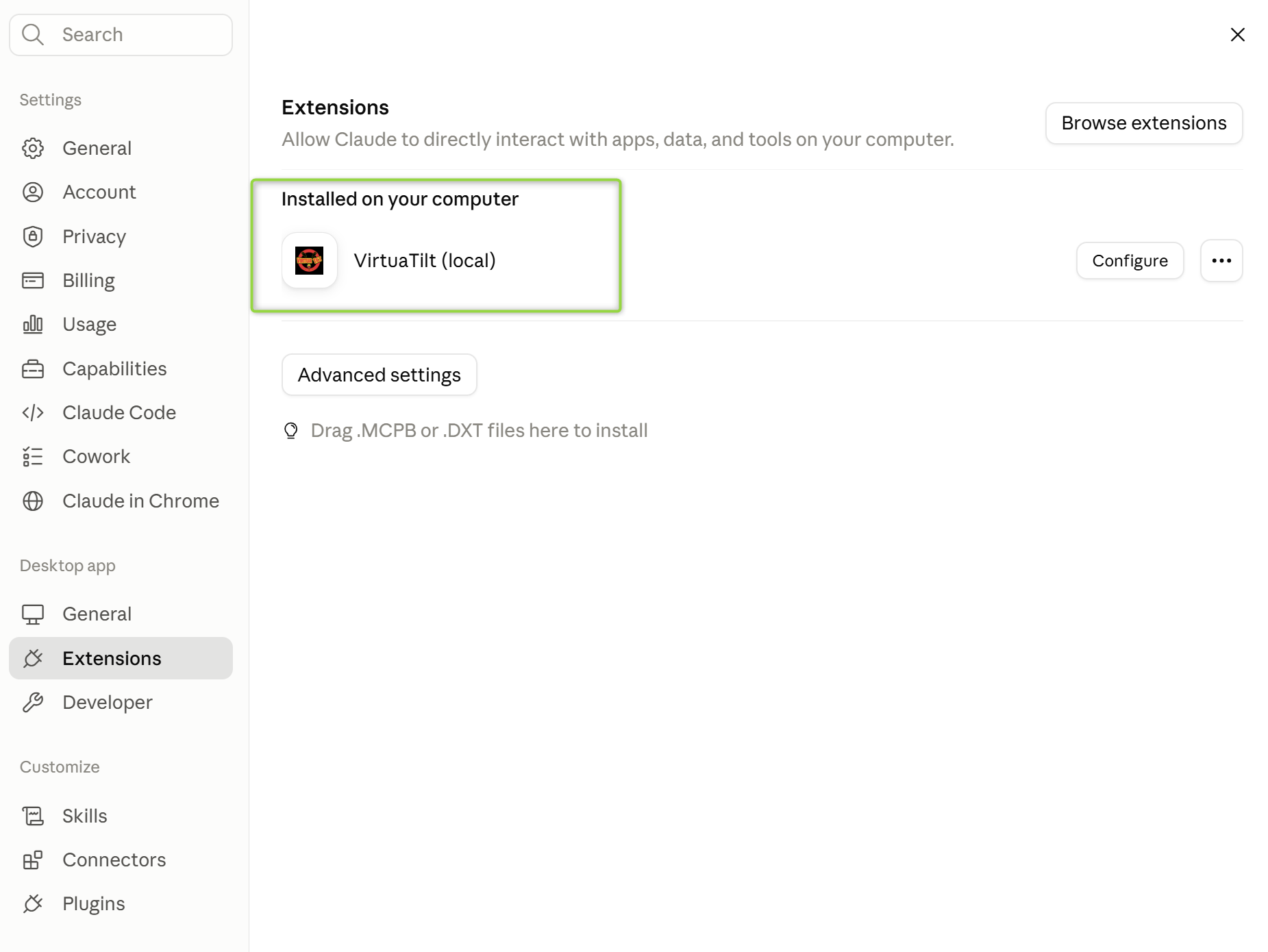
-
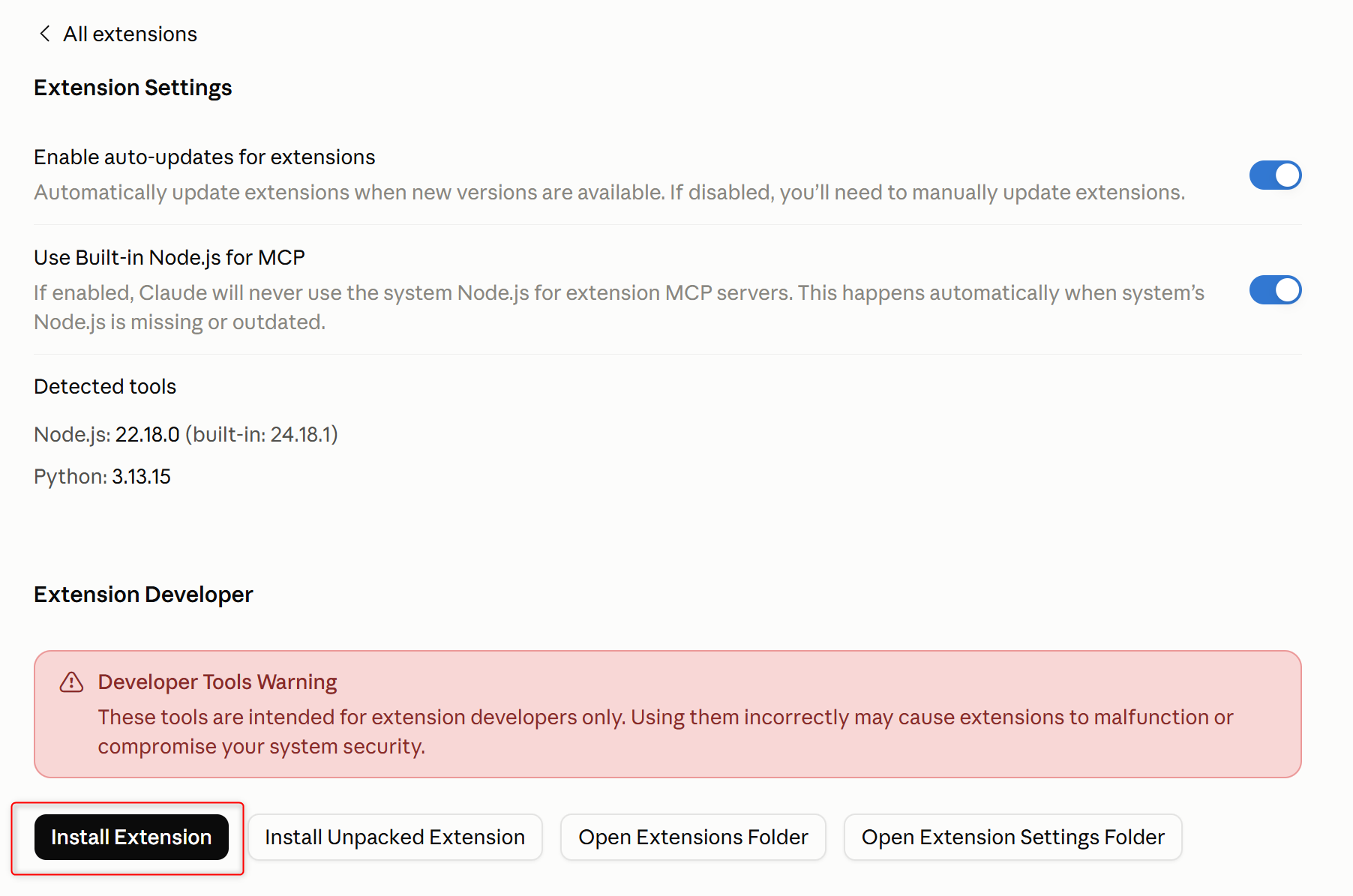
Scroll to Extension Developer and click
Install Extension…. Claude warns that these are developer
tools — that is expected for any extension not from its own directory.
-
Pick the
.mcpbfile you downloaded, then click Preview.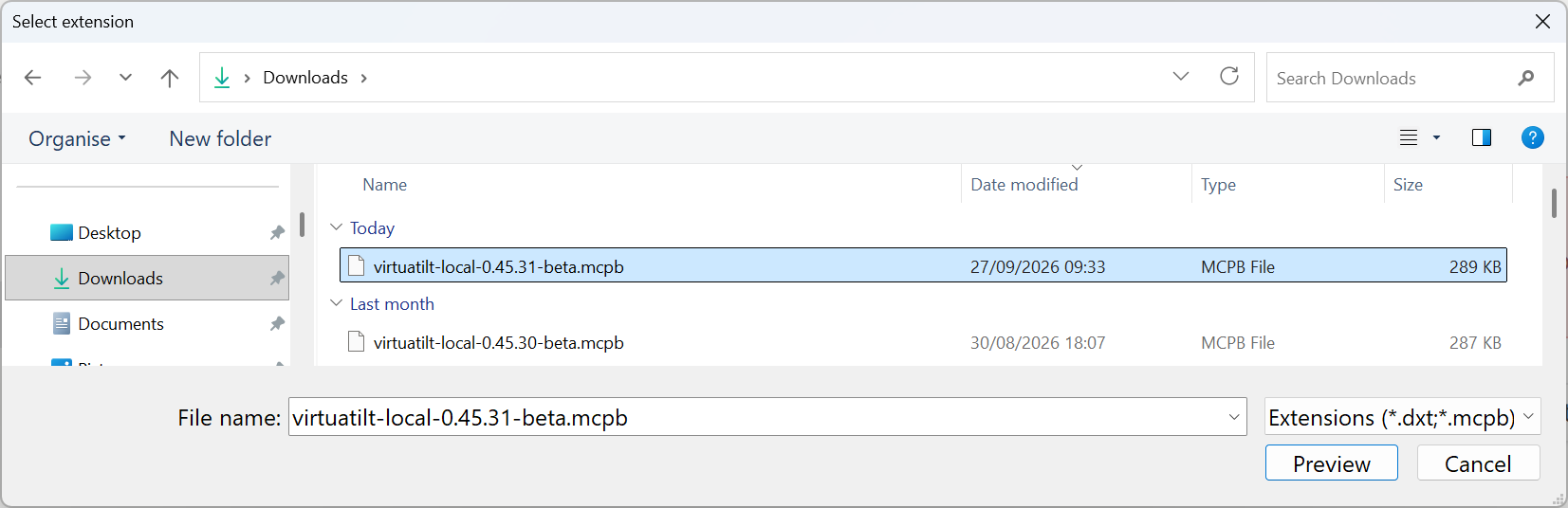
-
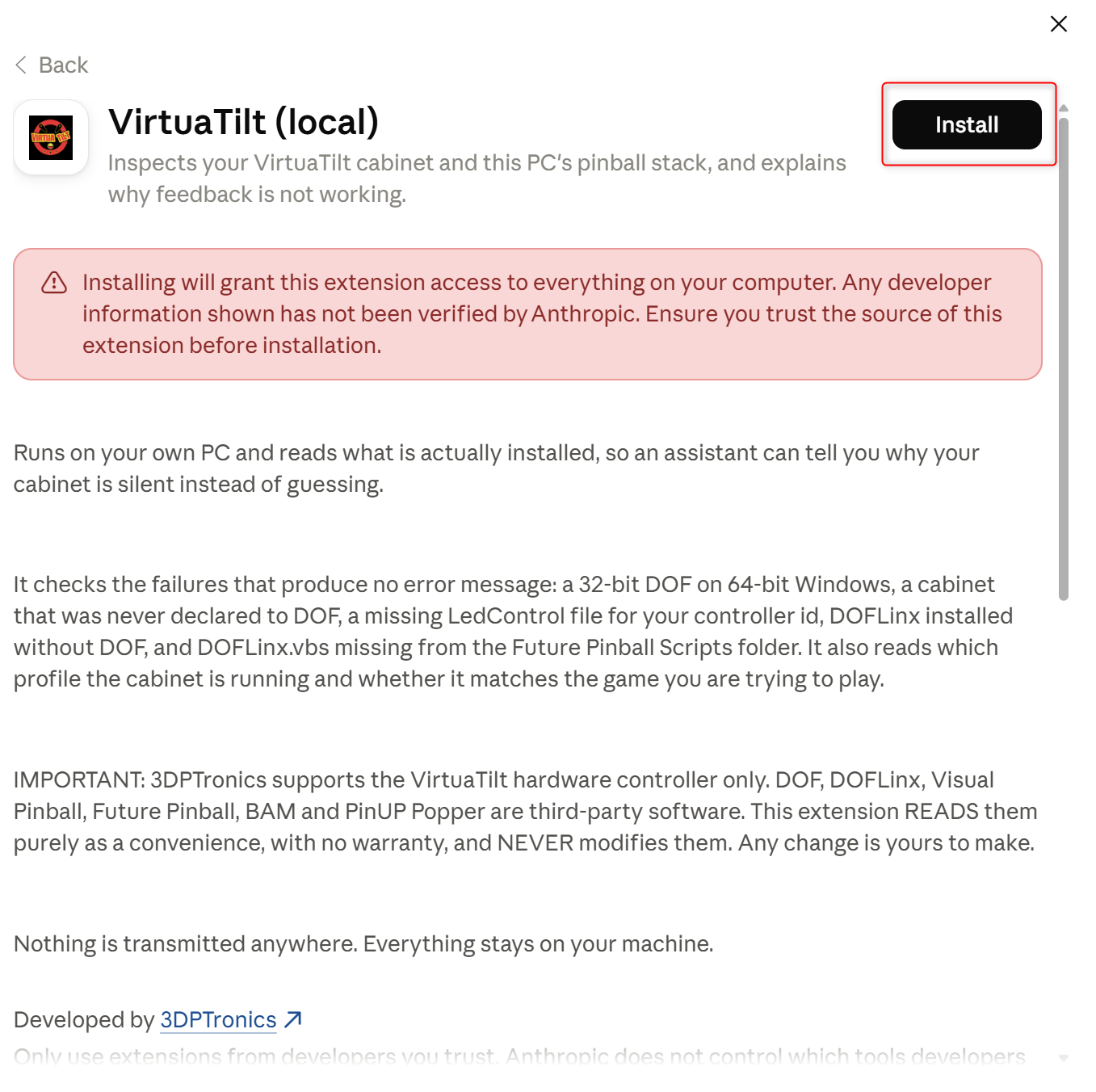
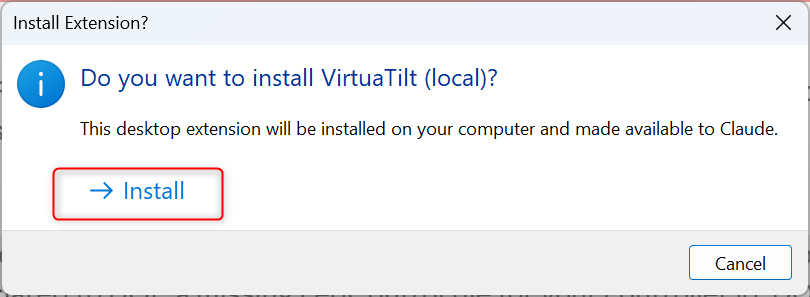
Claude shows you what the extension is and what it may do.
Read it, then click Install.
-
Confirm.
Pointing it at your VirtuaTilt download
The PC-side checks work straight away. To let it read the controller itself, give it the folder you unpacked the VirtuaTilt download into.
-
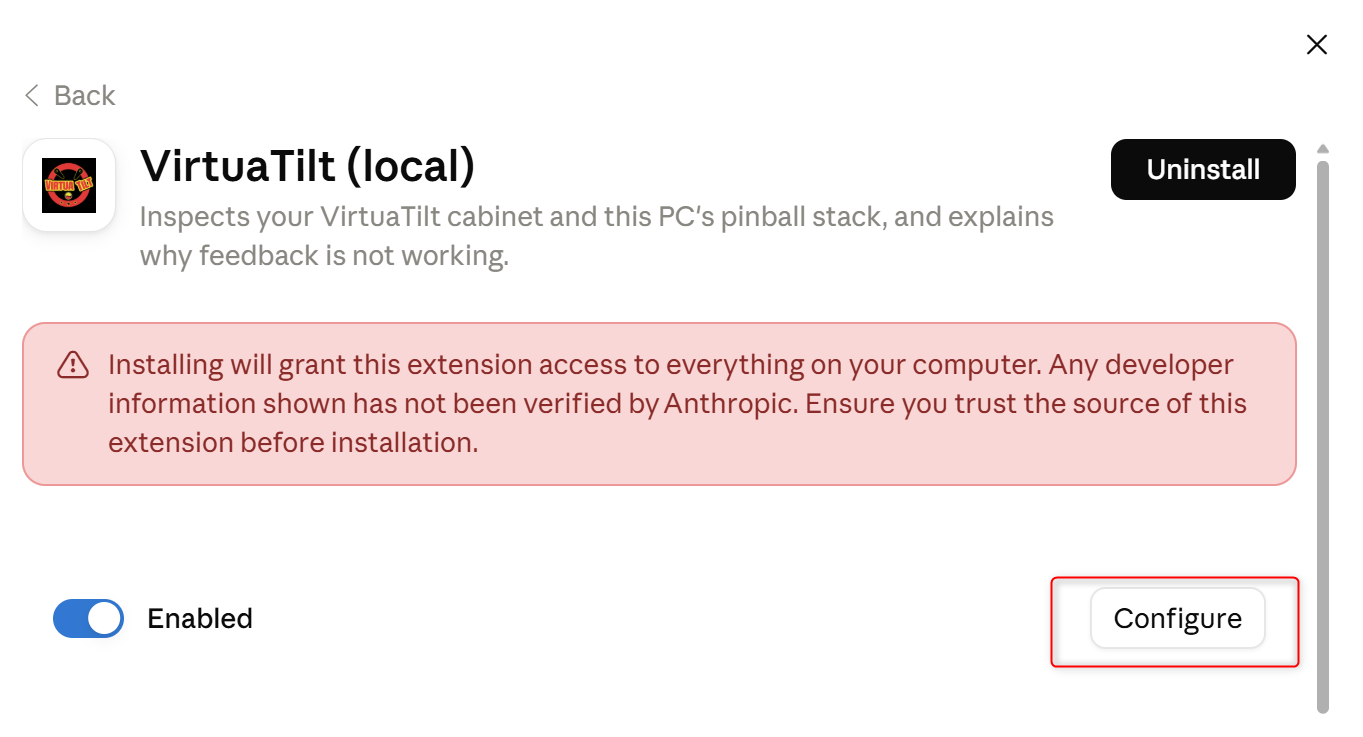
On the extension's page, click Configure.
-
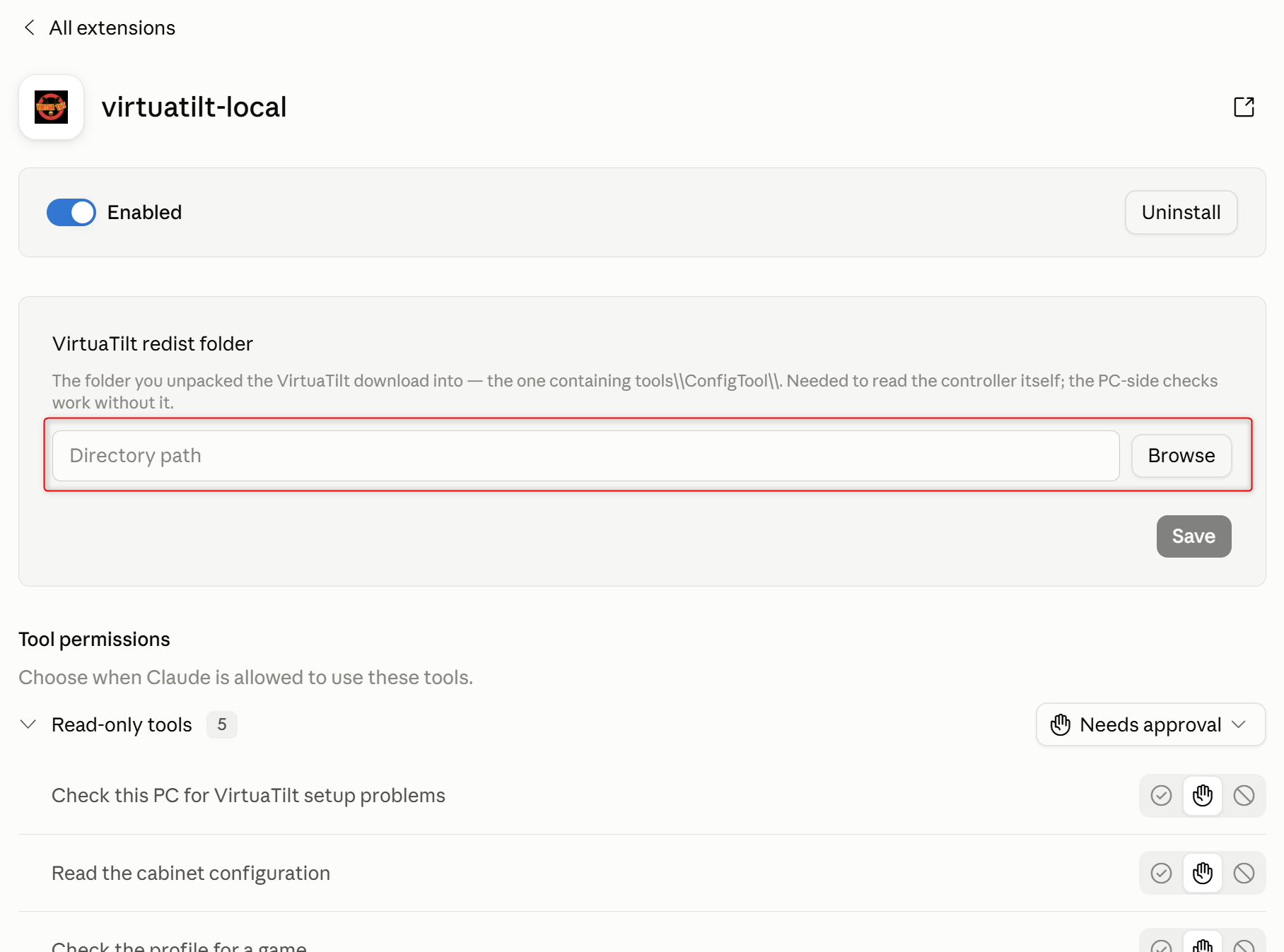
The settings panel opens — check behind the main window if you do
not see it. Click Browse.
-
Navigate to your unpacked VirtuaTilt download and pick the folder. Either
the VirtuaTilt-Redist-… folder itself or the
ConfigToolfolder inside it will do — the extension works out the rest. Not sure where you unpacked it? Ask Claude — “find my VirtuaTilt download” — and it will show you the full paths it can see, most recent first. You still choose which one.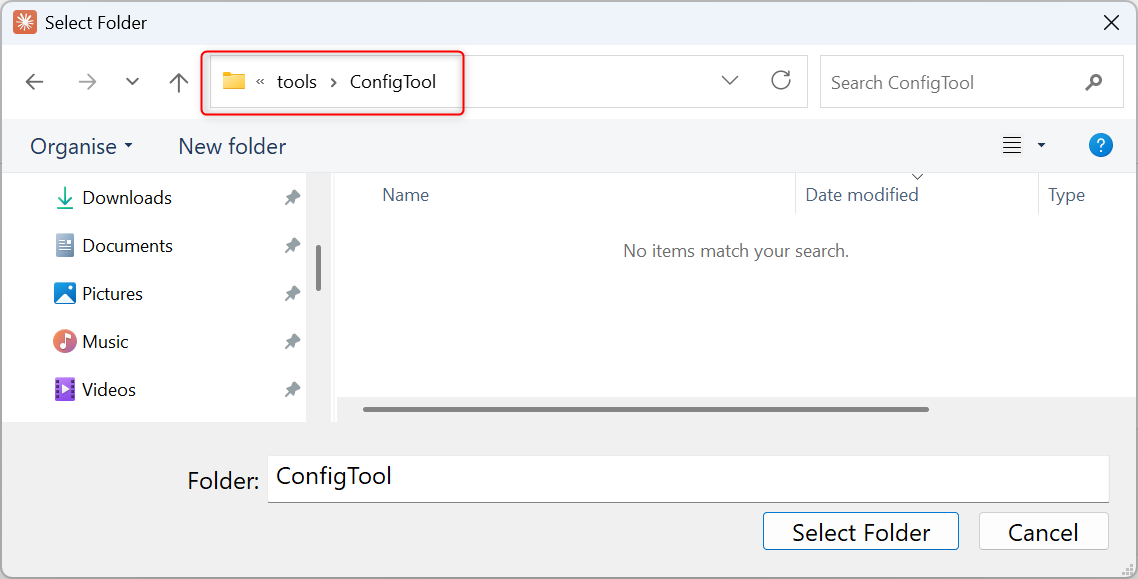
-
Click Save. This is easy to miss: without it the path is
not kept.
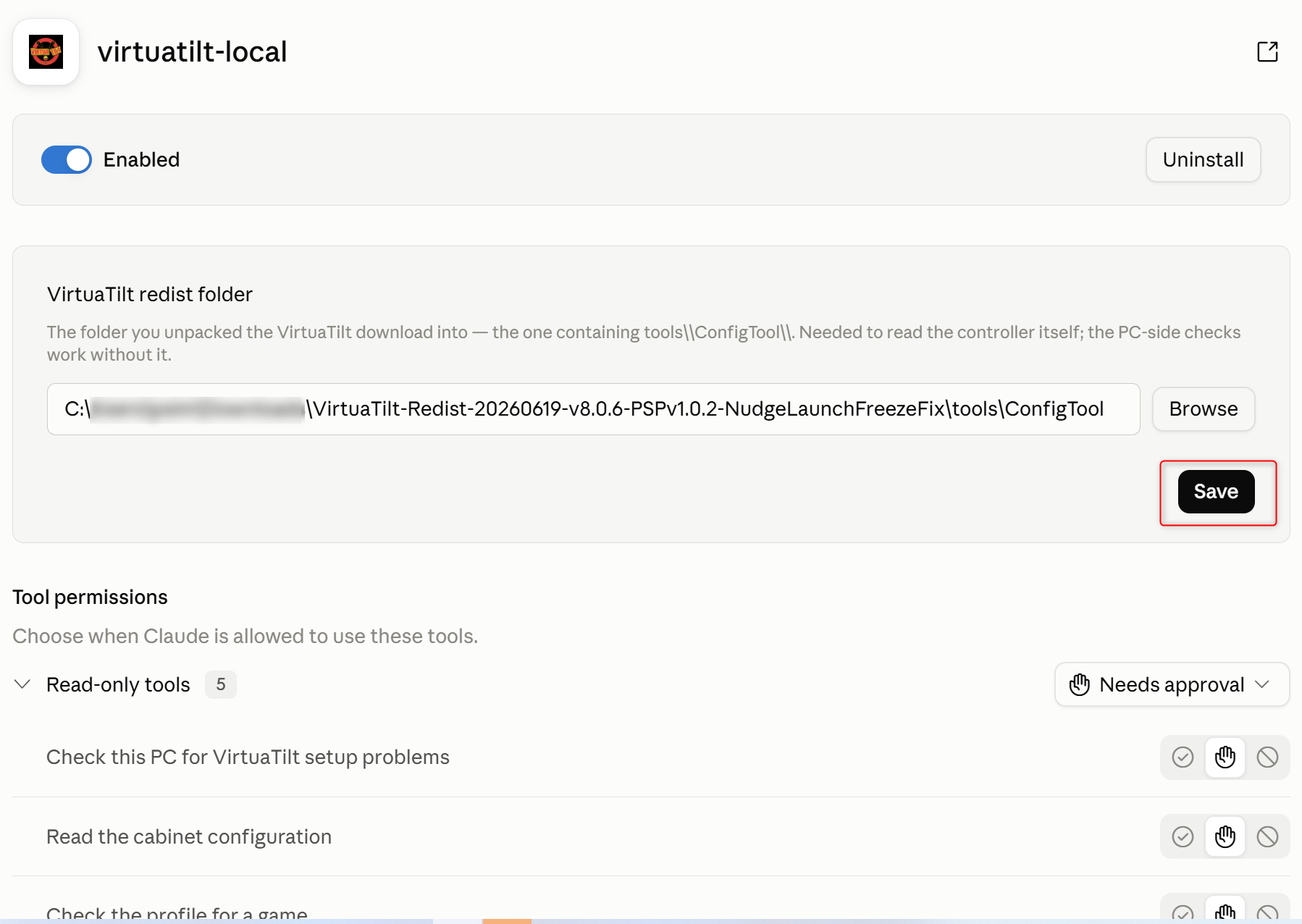
- Restart Claude Desktop. This is required, not a troubleshooting step. The app hands your folder to the extension at the moment it starts it, so a path saved while the app is running does not reach the extension until the next start. Until you restart, it will keep telling you no folder is configured — while your settings screen plainly shows the one you just picked.
Using it
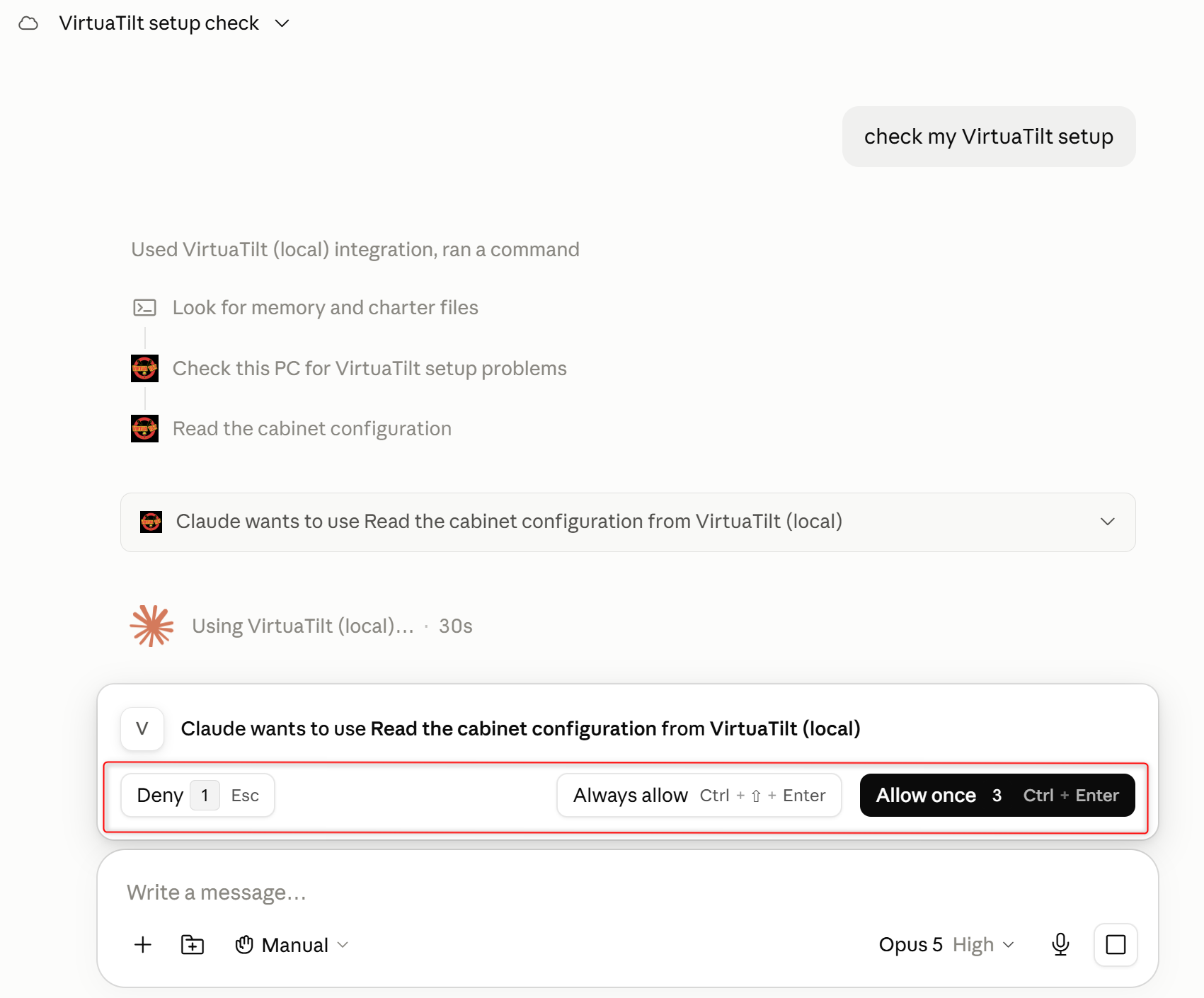
There is no window to open and no scan button to press. The extension gives Claude a set of tools, and Claude reaches for them when what you ask calls for one. So you just say what is wrong, the way you would to a person:
- “check my VirtuaTilt setup” — the full sweep of this PC, with a verdict at the end
- “my solenoids stopped working, what does my setup look like?”
- “which profile is my controller running?”
- “I want to play Pinball FX — am I set up for it?”
- “list my buttons”
- “is my firmware up to date?”
Claude asks your permission before each tool runs, and the first sweep touches several. Allow once runs it this one time; Always allow stops it asking for that tool again. That prompt is Claude's own safety check, not ours — nothing is read until you answer it.
Ask Claude anything about VirtuaTilt
Separately from the extension, you can connect Claude to our documentation. Answers come from our wiki and our profile catalogue, so they name the actual file you need instead of describing one that sounds right — and every answer links to the page it came from.
“Which profile do I load for Pinball FX?”
It names the file. Not a description of a file — the actual name, for wired and wireless, because the answer is different for each and leaving one out is how people get stuck. It also tells you which boot-button slot it is preloaded on and what colour the LED goes, so you can switch profiles at the cabinet without touching the PC.
“My shaker fires but the solenoids don't.”
It doesn't hand you ten things to try. It asks one question that halves the problem — run the Pinscape Output Port Tester with no game running.
Its own documentation explains why that works: the tester “bypasses all of the layers of software that the games use”. So if the coils fire there, your wiring, devices and firmware config are good and the fault is in the PC software. If they don't, it never was. One answer, and half the search space is gone.
“Will this work with the games I actually play?”
A straight answer per title, for USB and Bluetooth, and whether you need DOF at all or the game just works. Ask about something we have not tested and it says “not documented” rather than guessing — an over-promise before a purchase becomes a return afterwards.
Connecting it
Works on every Claude plan: Free, Pro, Max, Team and Enterprise. In Claude, open Customize → Connectors → Add custom connector and paste:
https://mcp.virtuatilt.com/mcp